
Why is job safety and health important?
In 2013, 4,585 employees died from occupational incidents, and there were a staggering 3.0 million total recordable cases of workplace injury and illness. On average, each of these 3.0 million cases required eight days away from work, which means U.S. employers as a whole paid for millions of days of lost work time. Experts estimate that workplace injuries and illnesses cost U.S. businesses more than $125 billion annually. Effective job safety and health programs not only help reduce worker injuries and illnesses, they save employers money in the long run.
How does OSHA contribute to job safety and health?
The primary goal of the Occupational Safety and Health Administration (OSHA) is to carry out the Occupational Safety and Health Act (OSH Act), which Congress originally passed in 1970. The OSH Act has undergone several amendments and revisions since its inception, but it is still in place “to assure so far as possible every working man and woman in the Nation safe and healthful working conditions and to preserve our human resources.” OSHA contributes to job safety and health by enacting regulations that forward this ideal.
Title 29 of the Code of Federal Regulations (CFR), Parts 1902-1990, houses all the OSHA standards, though OSHA also allows states to enact occupational safety and health laws of their own under federally-approved plans. State-run programs are at least as strict, and sometimes more so, than federal standards. This ensures a minimum standard of job safety and health that all employers must follow to protect employees.
Are all employees covered by the OSH Act?
The OSH Act covers all employees except public employees in state and local governments and those who are self-employed. Public employees in state and local governments are covered by their state’s OSHA-approved plan, if applicable.Federal employees are covered under the OSH Act’s federal employee occupational safety and health programs, which are outlined in 29 CFR Part 1960.
United States Postal Service employees, however, are subject to the same OSH Act coverage provisions as those in the private sector.Other federal agencies that have issued requirements affecting job safety or health include the Mine Safety and Health Administration (MSHA) and some agencies of the Department of Transportation (DOT), including the Federal Motor Carrier Safety Administration (FMCSA).
Employees in these industries are subject to their respective regulations.Additionally, businesses in the retail, service, finance, insurance and real estate sectors that are classified as low-hazard are exempt from most OSHA requirements, as are small businesses with 10 or fewer employees. Exceptions are discussed in 29 CFR Part 1904, which also explains which OSHA regulations exempt employers are still required to follow.
What are your responsibilities as an employer?
If you are an employer covered by the OSH Act, you must provide your employees with jobs and a place of employment free from recognized hazards that are causing, or are likely to cause, death or serious physical harm. You must also comply with the OSHA statutory requirements, standards and regulations that require you to:
- Provide well-maintained tools and equipment, including appropriate personal protective equipment (PPE)
- Provide medical assistance and guidance for employees sustaining workplace injuries/illnesses
- Provide required OSHA training
- Report accidents that result in fatalities to OSHA within eight hours
- Report accidents that result in the hospitalization of three or more employees to OSHA within eight hours
- Keep records of work-related accidents, injuries, illnesses and their causes
- Post annual injury/illness summaries for the required period of time
What are your rights as an employer?
When working with OSHA, you may do the following:
- Request identification from OSHA compliance officers
- Request an inspection warrant
- Receive a reason for inspection from compliance officers
- Have an opening and closing conference with compliance officers
- Accompany compliance officers on inspections
- Request an informal conference after an inspection
- File a notice of contest to citations or proposed penalties
- Apply for a variance from a standard’s requirements under certain circumstances
- Be assured of the confidentiality of trade secrets
- Submit a written request to the National Institute for Occupational Safety and Health (NIOSH) for information on potentially toxic substances in your workplace
What are employees’ responsibilities?
All employees are obligated to help prevent exposure to workplace safety and health hazards by becoming familiar with and adhering to all applicable OSHA requirements.
What are employees’ rights?
With regards to OSHA regulations, employees have the right, among other actions, to:
- Review employer-provided OSHA standards, regulations and requirements
- Request information from the employer on emergency procedures
- Receive adequate, OSHA-required safety and health training on toxic substances and emergency action plan(s)
- Ask the OSHA area director to investigate hazardous conditions or violations of standards in the workplace
- Have his or her name withheld from the employer when filing a complaint with OSHA
- Know what actions OSHA took as a result of the employee’s complaint and have an informal review of any decision not to inspect or issue a citation
- Have an employee representative accompany the OSHA compliance officer on inspections
- Observe monitoring and measuring of toxic substances or harmful physical agents and review related records (including medical records)
- Review the Log of Work-Related Injuries and Illnesses (OSHA 300 Form), if applicable, at a reasonable time
- Request a closing discussion following an inspection
- Object a citation’s set abatement period
- Seek safe and healthful working conditions without your employer retaliation
Why is OSHA important to your business?
OSHA plays a key role in making your facility a safe, healthy place to work. Beyond providing the tools and guidance to work toward an injury- and illness-free workplace, OSHA is important in identifying businesses that are not committed to safety. Employers that do not carefully follow OSHA regulations often face hundreds of thousands, if not millions, of dollars in fines.
How can you get more information on safety and health?
OSHA provides free publications, standards, technical assistance and compliance tools to help you understand the nuances of the regulations. OSHA’s website also offers extensive assistance by way of workplace consultation, voluntary protection programs, grants, strategic partnerships, state plans, training and education to guide you in your quest for workplace safety. To learn more about OSHA and the critical elements of a successful safety and health management system in your workplace, visit www.osha.gov.
This document is an introductory guideline. It does not address all potential compliance issues with OSHA standards. It is not meant to be exhaustive or construed as legal advice. Contact your licensed commercial property and casualty representative at Scurich Insurance or legal counsel to address applicable compliance requirements. © 2009-2012, 2015 Zywave, Inc. All rights reserved.
Read more

On April 30, 2018, the Occupational Safety and Health Administration (OSHA) announced it will require all establishments affected by the electronic reporting rule to submit their 2017 data to OSHA by July 1, 2018.
This announcement clarifies the requirement for establishments in states with an OSHA-approved plan. These establishments must submit electronic reports, regardless of whether the state has ratified or incorporated the electronic reporting rule into its OSHA state plan.
Establishments in all states, including those with an OSHA-approved state plan, should prepare to submit electronic reports by July 1, 2018. Affected establishments can accomplish this by:
- Becoming familiar with the requirements in the electronic reporting rule; and
- Transitioning their OSHA records to an electronic format approved by the Injury Tracking Application (ITA).
OSHA Electronic Reporting
OSHA’s electronic reporting rule was issued in 2016. The rule requires establishments to report data from their injury and illness records to OSHA electronically if they:
- Are already required to create and maintain OSHA injury and illness records and have 250 or more employees;
- Have between 20 and 249 employees and belong to a high-risk industry; or
- Receive a specific request from OSHA to create, maintain and submit electronic records, even if they would otherwise be exempt from OSHA recordkeeping requirements.
The electronic reporting rule applies to establishments, not employers. An employer may have several worksites or establishments. In these situations, some establishments may be affected while others are not.
To determine whether an establishment is affected, employers must determine each establishment’s peak employment during the calendar year. During this determination, employers must count every individual that worked at that establishment, regardless of whether he or she worked full-time, part-time, or was a temporary or seasonal worker.
OSHA-approved State Plans
The final rule required OSHA-approved state plans to adopt the electronic rule or “substantially identical” requirements within six months of the final rule’s publication date.
|
All Employers |
| California
Maryland
Minnesota
South Carolina
Utah
Washington
Wyoming |
|
Public Employers |
| Illinois
Maine
New Jersey
New York |
This means that OSHA-approved state plans have the authority to adopt reporting requirements that go above and beyond what is required by the federal rule. For this reason, establishments located in OSHA-approved state plan jurisdictions should consult with their local OSHA offices to make sure they are satisfying all electronic reporting requirements.
The OSHA-approved state plans shown on this map have not yet adopted the requirement to submit injury and illness reports electronically.
As a result, establishments in these states were not required to submit their 2016 data through the reporting website in 2017. However, OSHA has now clarified that they must submit their 2017 data in 2018.
Read more

Facebook recently announced that political consulting firm Cambridge Analytica obtained information from up to 87 million accounts without their users’ consent. Experts believe that collected data could include locations, interests, photos, status updates and more.
Facebook applications and third-party services can normally request access to an account’s information in order to add functionality or advertise products. However, experts allege that Cambridge Analytica violated Facebook’s terms of service by using the data to direct political campaigns and influence voters.
These allegations have highlighted concerns about data security, social media privacy and Facebook’s data protection practices. In order to keep your personal information safe, it’s important for you to be aware of how it can be exposed and what steps you can take to ensure you control access to your data.
Timeline of Events
In 2014, University of Cambridge researcher Aleksandr Kogan created a Facebook personality quiz that gave him data on approximately 270,000 Facebook users. At the time, Facebook’s terms of service also allowed Kogan to access data on these users’ friends—a total of 87 million accounts.
Although Kogan told users that their information would only be used for research, he later worked with Cambridge Analytica to market the data to political groups. While many experts speculate that Cambridge Analytica’s clients used this data to direct political messages and influence voters, investigators have yet to confirm if or how the data was used.
Facebook learned that Cambridge Analytica possessed the data in 2015 and requested that all copies be deleted. However, in March 2018, a number of news sources reported that the consulting firm kept and continued to use at least a portion of the data for its business practices. As a result, Facebook’s data protection practices are now under investigation by regulators.
Protecting Your Data
Many social media users assume that their personal information is safe, but this scandal has shown the importance of re-evaluating online security. Hackers can use data posted on social media to engage in identity fraud, social engineering schemes and more. Here are some tips you can use to secure your data on social media platforms:
- Check Facebook’s webpage about the exposed data to see if Cambridge Analytica obtained any of your personal information.
- Go through all of the privacy settings on each of your social media accounts to see if the security features or terms of service have changed.
- Always assume that any information you post online can be shared with the public.
- Enable two-factor authentication on all devices and services that offer it.
- Create strong passwords and update them regularly.
Call us at 831-661-5697 for more help staying safe online.
Read more

On April 30, 2018, the Occupational Safety and Health Administration (OSHA) announced it will require all establishments affected by the electronic reporting rule to submit their 2017 data to OSHA by July 1, 2018.
This announcement clarifies the requirement for establishments in states with an OSHA-approved plan. These establishments must submit electronic reports, regardless of whether the state has ratified or incorporated the electronic reporting rule into its OSHA state plan.
Establishments in all states, including those with an OSHA-approved state plan, should prepare to submit electronic reports by July 1, 2018. Affected establishments can accomplish this by:
- Becoming familiar with the requirements in the electronic reporting rule; and
- Transitioning their OSHA records to an electronic format approved by the Injury Tracking Application (ITA).
OSHA Electronic Reporting
OSHA’s electronic reporting rule was issued in 2016. The rule requires establishments to report data from their injury and illness records to OSHA electronically if they:
- Are already required to create and maintain OSHA injury and illness records and have 250 or more employees;
- Have between 20 and 249 employees and belong to a high-risk industry; or
- Receive a specific request from OSHA to create, maintain and submit electronic records, even if they would otherwise be exempt from OSHA recordkeeping requirements.
The electronic reporting rule applies to establishments, not employers. An employer may have several worksites or establishments. In these situations, some establishments may be affected while others are not.
To determine whether an establishment is affected, employers must determine each establishment’s peak employment during the calendar year. During this determination, employers must count every individual that worked at that establishment, regardless of whether he or she worked full-time, part-time, or was a temporary or seasonal worker.
OSHA-approved State Plans
The final rule required OSHA-approved state plans to adopt the electronic rule or “substantially identical” requirements within six months of the final rule’s publication date.
This means that OSHA-approved state plans have the authority to adopt reporting requirements that go above and beyond what is required by the federal rule.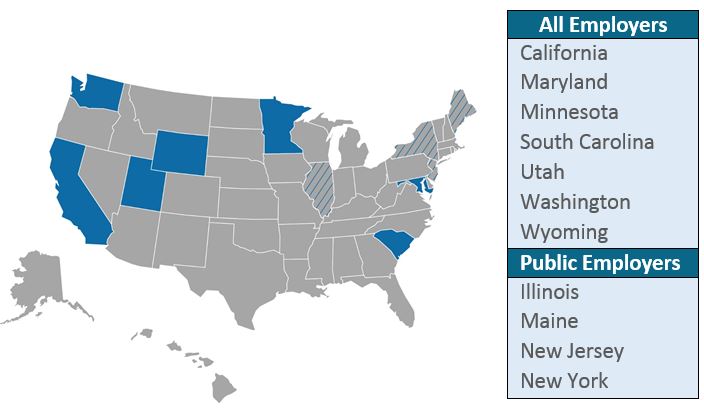 For this reason, establishments located in OSHA-approved state plan jurisdictions should consult with their local OSHA offices to make sure they are satisfying all electronic reporting requirements.
The OSHA-approved state plans shown on this map have not yet adopted the requirement to submit injury and illness reports electronically.
As a result, establishments in these states were not required to submit their 2016 data through the reporting website in 2017. However, OSHA has now clarified that they must submit their 2017 data in 2018.
Read more

Inspect for Water Damage
Melting snow and ice can increase water flow around your property, so carefully inspect the entire building for water damage. Check the exterior foundation, interior walls and windows for moisture, leaks or condensation, and clear out and repair any damaged gutters and downspouts.
Check the Roof
Winter storms can damage your roof, but you may not notice the damage until the roof starts to leak. Perform a detailed inspection of the roof and note any repairs you need to make.
Touch Up the Exterior
Cold winter weather can cause paint to chip, and flying debris can dent siding. Walk around the building, note any damaged paint or siding, and fix the areas. Sometimes, a simple touch up is all that’s needed rather than refinishing the entire building.
Repair the Parking Area
If freezing temperatures created cracks or holes in the parking lot or sidewalks, fix the problem areas. You’ll also want to power wash the area to remove dirt, mud or other debris, repaint any faded lines and repair broken signs. With a clean parking area, you reduce liability and improve visual appeal.
Wash the Windows
Remove winter grime and buildup on the exterior and interior windows. Clean windows boost productivity and improve the appearance of your commercial building.
Boost Ventilation
Open windows and air out the stuffy building if possible. You may also inspect and clean the HVAC system and install fans or dehumidifiers in damp areas as needed.
Improve Curb Appeal
Fallen branches, debris and litter affect your property’s curb appeal and can create hazards for employees and visitors. Remove any debris, and trim trees, shrubs and bushes to reduce hiding places for burglars and future damage risks. Consider planting flowers and grass, too, as you improve your property’s curb appeal and safety.
Perform Pest Control
Warmer temperatures may attract bugs, insects and rodents to your property, so apply a pest spray around the building’s perimeter, and close any holes that may allow animals to enter the building. You may also want to treat any ponds, bird baths or other standing water with Mosquito Dunk or a similar product.
Assess Insurance
Your commercial property insurance protects your company, so schedule an assessment. Ensure you have adequate coverage for your needs as you look forward to the rest of the year.
This spring, you can perform maintenance on your commercial building to improve its appearance and functionality. These tips also reduce your liability and protect your employees and clients.
Read more

Workers’ Compensation Insurance is an important product for employees. There are six common myths that surround this insurance, though. Debunk the myths so you can understand and maximize your benefits.
1. Small businesses don’t need to offer Workers’ Compensation Insurance.
You may work in a small business with only a few employees. Federal and state laws dictate that most businesses with one or more employees must carry Workers’ Compensation insurance. Be sure your employer carries this valuable insurance even if you are a solo employee.
2. I don’t need Worker’s Compensation insurance because my job is low-risk.
Some jobs, like construction, farming and commercial fishing, are dangerous. However, even low-risk jobs include injury and illness risks. You could develop carpal tunnel while typing or slip and fall in the break room during lunch. Your employer will pay lower Workers’ Compensation insurance premiums if you work in a low-risk job, and you absolutely must ensure you’re covered no matter what type of work you perform.
3. I’m careful and won’t get hurt.
While you might have an accident-free employment history, it only takes a second for an accident to happen. Plus, some workplace accidents or injuries occur because of someone else’s actions. Ensure you are covered by Workers’ Compensation regardless of your careful track record.
4. My boss is like family, and I could never sue.
It’s great that you have such a good relationship with your boss and feel like family. However, you are still employer-employee. By law, your employer must provide Workers’ Compensation for you. You also owe it to yourself and your dependents to have this valuable coverage in place in case you are injured or disabled and can’t work.
5. My boss will pay my work-related injury or illness expenses out-of-pocket.
Perhaps your boss has vowed to pay out-of-pocket for your medical, living and others expenses if you’re injured or become ill on the job. Unfortunately, your boss may decide not to pay, particularly when the Workers’ Compensation claims reach thousands of dollars or affect multiple employees. Always protect yourself with Workers’ Compensation insurance so that you can ensure your expenses are paid.
6. Any pain I feel at work is eligible for Workers’ Compensation.
While assembling furniture at work, you notice that your arm hurts. Instead of rushing to file a Workers’ Compensation claim, think about when and where the pain started. If it originated from an activity or injury that occurred outside of work, don’t file a Workers’ Compensation claim.
Workers’ Compensation insurance is important. Understand these six myths as you make sure you’re covered. For more details, contact your Human Resources manager or insurance agent.
Read more
